Setting up a virtual office Baltimore address is the fastest way to put a remote or hybrid business on the local map. A virtual office in Baltimore gives you a real street address with mail handling, call answering and meeting-room access on demand — without paying for a desk you rarely sit at. For the wider picture on how these plans work, see our complete guide to virtual offices.
For an overview of every option, see all business addresses in Baltimore.
Wezoo brings together virtual office Baltimore options from established providers like Regus, Spaces and HQ so you can compare addresses in one place and send a request in minutes. It is the same approach we take in other US cities, from a virtual office in Virginia Beach to a virtual office in Fort Worth. Below you will find the four Baltimore addresses on Wezoo, what each is best for, and how to get set up.
Wezoo snapshot — Baltimore virtual offices
- 4 virtual offices available on Wezoo
- Pricing: quote-based — providers confirm a monthly plan on request (typically $50–$150 per month nationally)
- Top operators: Regus, Spaces, HQ
- Main areas: Inner Harbor & downtown, Harbor East / Fells Point, South Baltimore
What is a virtual office in Baltimore?
A virtual office is a professional business address you can use without renting physical space. In practice, a virtual office Baltimore plan covers a genuine local address plus mail receipt and forwarding, with optional call answering and pay-as-you-go access to meeting rooms in the same building.
You can list the address on your website, your invoices and your official company filings. For a remote team, that means looking rooted in Baltimore while everyone works from wherever they are.
What does a virtual office in Baltimore cost?
There is no fixed public price. Virtual office Baltimore plans are quote-based: providers confirm a monthly rate once they know which address and services you need. As a national benchmark, mail-only plans tend to start around $50 a month, while full plans with call answering and meeting-room credits run toward $150.
Because the four Baltimore addresses come from national operators, the safest move is to send a short request with the location and services you want, then compare what each one quotes. Wezoo passes your request straight to the provider, so there is no markup.
The 4 best virtual office Baltimore locations
Here are the four virtual office Baltimore addresses listed on Wezoo, each from an established operator with on-site meeting rooms you can add when needed.
1. Stadium Square — South Baltimore

What to expect: Spaces runs a design-led building in South Baltimore, a short walk from Camden Yards and the Sharp-Leadenhall district. A virtual office plan here gives you a 145 West Ostend Street address with mail handling, plus access to bright lounges and on-site meeting rooms when a client wants to meet in person. It suits founders who want a current, creative address rather than a buttoned-up tower.
Operator: Spaces (4.2★) · Address: 145 West Ostend Street, Baltimore 21230
👉 Request this address on Wezoo
2. 729 East Pratt — Inner Harbor

What to expect: This Regus address sits on Pratt Street along the Inner Harbor waterfront, steps from the convention center and the harbor promenade. The location reads as established and central, which matters when invoices and your website carry a downtown Baltimore address. Mail is received and signed for, and meeting rooms are available on the same floor by the hour.
Operator: Regus (4.4★) · Address: 729 East Pratt Street, Baltimore 21202
👉 Request this address on Wezoo
3. 1820 Lancaster Street — Harbor East / Fells Point
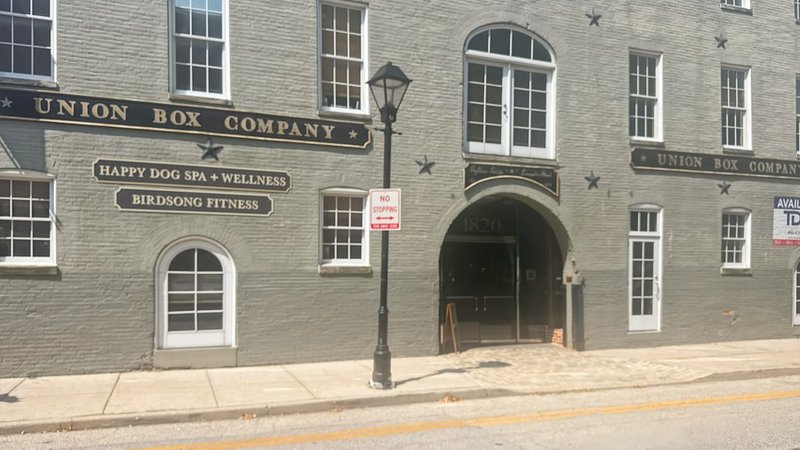
What to expect: HQ holds a spot in Harbor East, on the edge of the cobblestone streets of Fells Point. The address carries the polish of one of Baltimore’s newest waterfront districts, surrounded by restaurants and hotels. It is a practical pick for a hybrid team that occasionally needs a room to meet near the harbor.
Operator: HQ (3.9★) · Address: 1820 Lancaster Street, Baltimore 21231
👉 Request this address on Wezoo
4. Inner Harbor Center — Inner Harbor / CBD

What to expect: Inner Harbor Center puts you at 400 East Pratt Street in the heart of the central business district, between the harbor and the financial core. It is the most central of the four, with transit, parking and the light rail close by. Use it as your registered business address and add call answering or forwarding as the company grows.
Operator: Regus (4.4★) · Address: 400 East Pratt Street, Baltimore 21202
👉 Request this address on Wezoo
When is a virtual office in Baltimore the right choice?
A virtual office fits when you need a credible local presence but not a permanent room. Three common cases:
- New LLCs and startups: use the address as your registered business address with the State of Maryland and keep your home address private.
- Remote and hybrid teams: give clients a downtown Baltimore address and forward mail to wherever the team works.
- Out-of-state companies: open a Maryland address to win local contracts without leasing space.
If your needs are growing toward a permanent room instead, compare full-time office space in Baltimore as well. And if you are weighing cities, our guides to a virtual office in San Francisco, a virtual office in Oklahoma City, a virtual office in Tucson and a virtual office in El Paso follow the same format.
How to set up your virtual office in Baltimore
Getting started is quick — most addresses activate within a business day.
- Pick the location. Compare the four Baltimore addresses and choose the area and operator that fit your business.
- Send a request. Share the address and the services you need; the provider confirms terms, usually within a business day.
- Go live. Activate the address, set your mail-forwarding preference, and start using it on your site, invoices and registered filings.
You can register a Maryland business and appoint a registered agent through Maryland Business Express, and find local permits and resources via the City of Baltimore.
Ready to set up your virtual office in Baltimore?
Frequently asked questions about a virtual office Baltimore plan
What does a virtual office in Baltimore cost?
Pricing is quote-based. Mail-only plans typically start near $50 a month nationally, while full plans with call answering and meeting-room access run toward $150. Send a request to get an exact Baltimore quote.
Can I use a virtual office as my registered business address in Maryland?
Yes. A virtual office Baltimore address can serve as your official registered business address for an LLC or corporation. You register the entity through Maryland Business Express.
What is included with a virtual office in Baltimore?
A business address and mail handling come standard, with forwarding or scanning, call answering and on-site meeting-room access available to add.
How fast can I get set up?
Most Baltimore addresses activate within one business day once you confirm the plan and your mail-forwarding preference.
Which Baltimore areas have virtual offices?
The four addresses on Wezoo sit in the Inner Harbor and downtown core, Harbor East near Fells Point, and South Baltimore close to the stadiums. Operators include Regus, Spaces and HQ.